RAG with Vector Databases in Node.js (2026 Complete Guide)
Retrieval-Augmented Generation, or RAG, has become one of the most important patterns in modern AI applications. Instead of asking a language model to answer from memory alone, RAG first retrieves relevant context from your own data and then uses that context to generate a better answer.
This approach is especially useful when you want your AI system to answer questions from documents, knowledge bases, product manuals, support tickets, or internal company data.
In this guide, we will learn:
- What RAG is and why it matters
- How vector databases work
- How embeddings power semantic search
- How to build a RAG pipeline in Node.js
- How chunking and metadata improve retrieval
- How hybrid search improves accuracy
- How to design a production-ready RAG system
What Is RAG?
Retrieval-Augmented Generation is a pattern where the application retrieves relevant information from an external data source before generating a response. This makes the model answer more grounded, more current, and more specific to your data.
Instead of relying only on the model’s internal training data, RAG combines two steps:
- Retrieve relevant information from your knowledge source
- Send that information to the model as context
This is a strong fit for enterprise search, document chat, knowledge assistants, customer support bots, and internal workflow automation.
Why Vector Databases Are Used in RAG
Vector databases store embeddings, which are numeric representations of text or other content. These vectors make it possible to search by meaning instead of exact keywords.
That matters because users rarely ask questions using the exact same words that appear in your documents. A vector database helps find relevant content even when wording is different.
Common things vector databases do include:
- Store embeddings efficiently
- Run similarity search
- Support metadata filtering
- Scale to large datasets
- Enable fast retrieval for AI systems
What Are Embeddings?
Embeddings are numeric vector representations of text. They convert language into a format that machines can compare mathematically.
For example, two sentences with similar meaning should have embeddings that are close to each other in vector space. That is why embeddings are the foundation of semantic search and RAG.
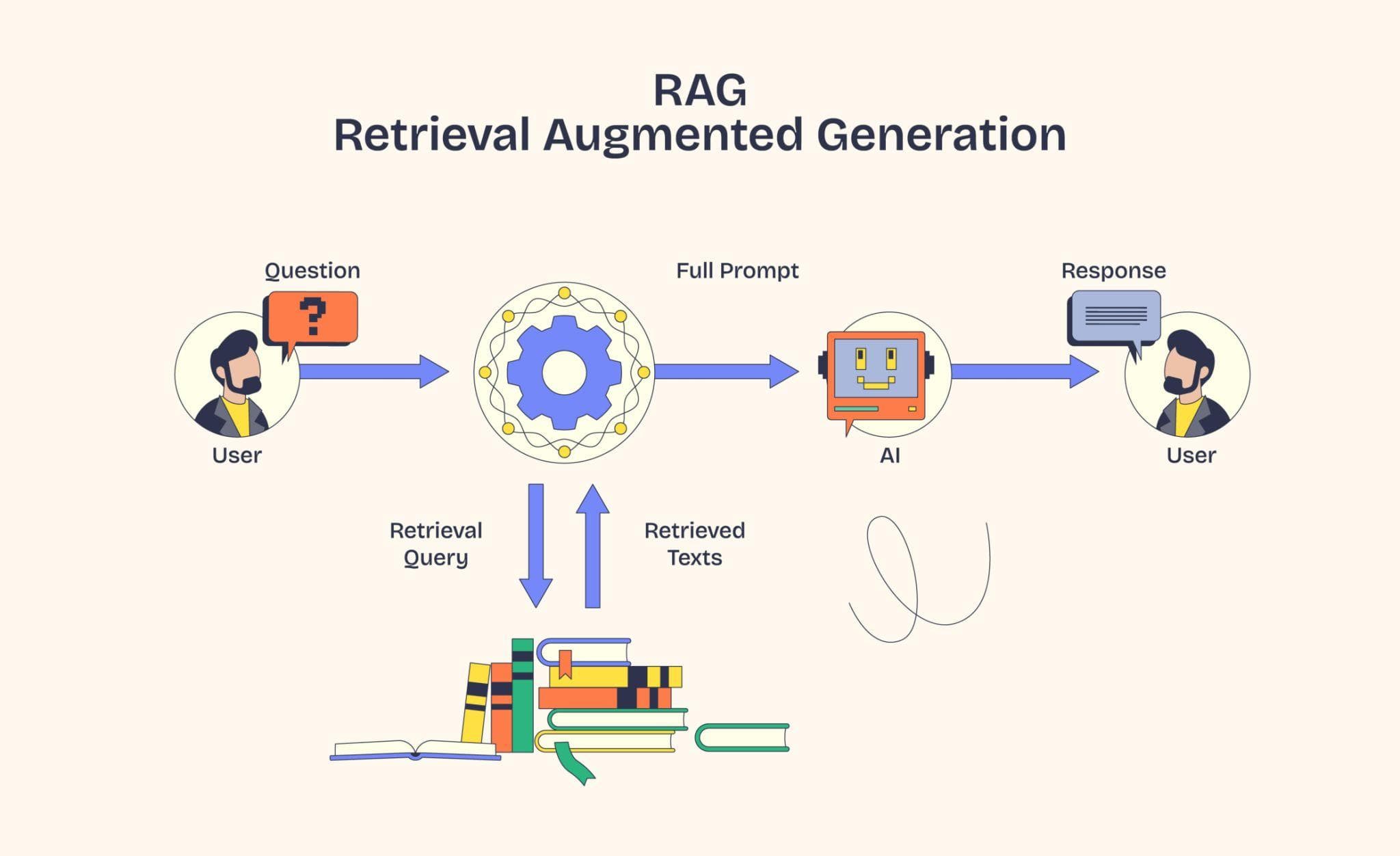
How RAG Works
The basic RAG workflow looks like this:
- A user asks a question
- The question is converted into an embedding
- The vector database searches for similar chunks
- The top results are added as context
- The LLM generates an answer using that context
This approach helps the model give better answers without retraining the whole model every time your data changes.
Real-World Use Cases
- Internal company knowledge assistants
- Customer support chatbots
- Document question-answering systems
- Legal and compliance search
- HR policy assistants
- Product documentation search
- Healthcare knowledge retrieval
- Sales enablement tools
- E-commerce catalog assistants
Why Developers Use RAG Instead of Fine-Tuning First
For many applications, RAG is faster to build and easier to maintain than fine-tuning. If your data changes often, RAG is usually the better choice because you can update documents without retraining the model.
RAG also gives better control over citations, source grounding, and retrieval quality.
Best Vector Database Options
There are many vector database and vector search options in the ecosystem. Popular choices include managed vector databases, open-source vector libraries, and search engines with vector capabilities.
- Pinecone for managed vector search
- FAISS for local or embedded similarity search
- Elasticsearch for hybrid retrieval use cases
- PostgreSQL with vector extensions for simpler stacks
Recommended RAG Architecture
A practical production architecture usually looks like this:
Documents → Chunking → Embeddings → Vector Database → Retrieval → Prompt Context → LLM
The backend should handle document processing, vector storage, retrieval logic, and answer generation.
Step 1: Create a Node.js Project
mkdir rag-vector-db
cd rag-vector-db
npm init -y
Step 2: Install Required Packages
npm install express dotenv axios multer
You may also add SDKs for embeddings, vector search, or a database client depending on your stack.
Step 3: Create the Server
const express = require('express');
const dotenv = require('dotenv');

dotenv.config();

const app = express();
app.use(express.json());

app.listen(3000, () => {
  console.log('Server running on port 3000');
});
Step 4: Chunk Your Documents
Long documents should be broken into smaller chunks before embedding. This improves retrieval quality and prevents context windows from being overloaded.
Good chunking usually means:
- Keeping chunks semantically complete
- Avoiding very large chunks
- Using overlap when needed
- Preserving headings and source metadata
Example Chunk Structure
{
  "chunk_id": "doc_101_01",
  "document_id": "doc_101",
  "title": "Refund Policy",
  "content": "Refunds are available within 7 days...",
  "metadata": {
    "source": "support-docs",
    "category": "billing",
    "page": 2
  }
}
Step 5: Generate Embeddings
After chunking, each chunk is converted into an embedding and stored in the vector database with metadata.
async function createEmbedding(text) {
  // Example placeholder logic
  return [0.12, 0.98, 0.44, 0.31];
}
In a real application, this embedding array would come from an embeddings API or model.
Step 6: Store Vectors in the Database
Each record usually contains the chunk text, embedding vector, and metadata fields such as document type, source, tags, tenant ID, or access level.
{
  "id": "chunk_001",
  "vector": [0.12, 0.98, 0.44, 0.31],
  "metadata": {
    "title": "HR Policy",
    "department": "hr",
    "visibility": "internal"
  }
}
Step 7: Retrieve Similar Chunks
When the user asks a question, the query is converted into an embedding and matched against the vector database to find the closest chunks.
async function searchSimilarChunks(queryEmbedding) {
  // Example placeholder logic
  return [
    { id: 'chunk_001', score: 0.92 },
    { id: 'chunk_014', score: 0.88 }
  ];
}
Step 8: Build the Prompt
After retrieval, the top chunks are placed into the prompt context before sending the request to the LLM.
const prompt = `
Use the following context to answer the question.

Context:
- Refunds are available within 7 days.
- Shipping costs are non-refundable.

Question:
What is the refund policy?
`;
Step 9: Generate the Final Answer
The model reads the retrieved context and produces an answer that is much more relevant than a generic response.
Why Chunk Metadata Matters
Metadata makes retrieval smarter. It allows the system to filter by document type, language, product, tenant, department, or access level.
Useful metadata examples:
- source
- document_id
- category
- language
- tenant_id
- page_number
- created_at
What Is Hybrid Search?
Hybrid search combines vector similarity with lexical search. This is useful when exact keywords matter as much as semantic meaning.
For example, product names, error codes, invoice numbers, and legal terms often work better with a hybrid strategy.
Why Hybrid Search Is Important
- Improves recall
- Handles exact keywords better
- Reduces missed matches
- Works well for enterprise search
Common Mistakes in RAG Systems
- Using chunks that are too large
- Ignoring metadata filtering
- Retrieving too many irrelevant chunks
- Not evaluating answer quality
- Storing poor-quality embeddings
- Skipping access control checks
Security Best Practices
- Keep embeddings and documents protected
- Apply tenant-level filtering
- Do not expose raw internal documents publicly
- Validate file uploads
- Use rate limiting on question endpoints
- Audit retrieval logs
Performance Tips
- Precompute embeddings for documents
- Cache common queries
- Use efficient chunk sizes
- Store high-value metadata
- Monitor retrieval latency
- Test recall with real user questions
Best Folder Structure
rag-vector-db/
  src/
    controllers/
    services/
    utils/
    routes/
    embeddings/
    vector-store/
  .env
  package.json
  server.js
Production Architecture Example
Frontend → Node.js API → Embedding Service → Vector Database → LLM API
This keeps the system modular and secure. The frontend should never directly access sensitive retrieval logic or secret API keys.
Final Thoughts
RAG with vector databases is now one of the most practical ways to build AI applications that feel smart, useful, and grounded in real data.
If you are building an AI assistant, document search tool, or enterprise knowledge system, learning embeddings, vector search, chunking, and hybrid retrieval will give you a very strong foundation.
Developers who understand retrieval systems will be able to build better AI products faster.